75% Magnetic Wireless Keyboard: Rapid Trigger & 8K Polling
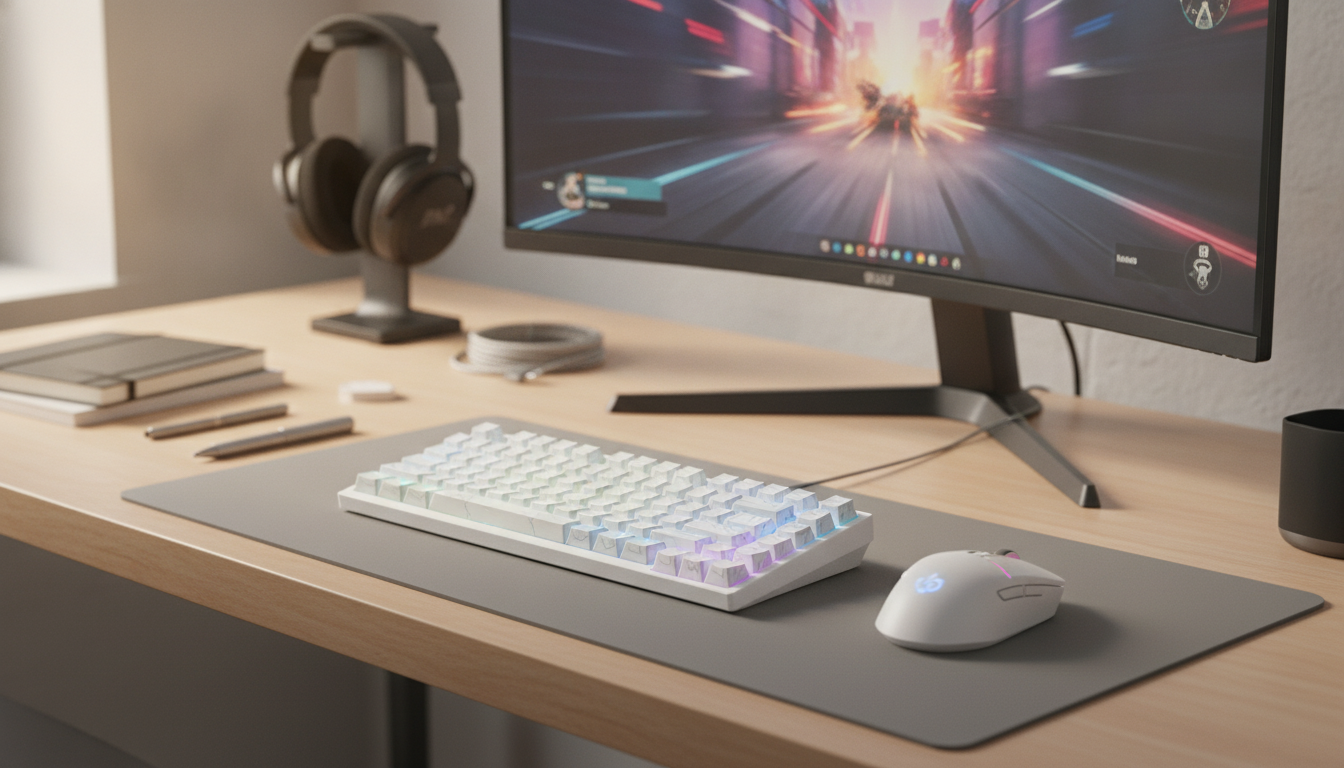
75% Magnetic Wireless Gaming Keyboard with Rapid Trigger and 8K Polling
A compact 75% board built around magnetic switch sensing, rapid trigger behavior, and high polling for fast, consistent inputs. This guide breaks down what those features change in real play, what to look for in daily use, and how to set it up for stable performance across wireless and wired sessions.
What makes a magnetic gaming keyboard feel different
Magnetic (Hall-effect style) keyboards don’t rely on a single fixed contact point the way many mechanical switches do. Instead, the board reads key travel as a continuous signal, which can make inputs feel more “measured” and controllable.
- Fine travel-based sensing: Key movement is detected across the press, not just at one actuation point, which opens the door to much more precise tuning.
- Adjustable actuation and release: Set a light, quick trigger for fast taps or raise it for steadier presses that resist accidental inputs.
- More consistent repeated inputs: When strafing or changing direction quickly, stable sensing can help reduce that “dead” feeling where a key doesn’t seem ready to re-register.
Rapid trigger: why it matters for repeated movement and tap timing
Rapid trigger changes the “reset” behavior. Instead of waiting for a key to rise back above a fixed reset point, the keyboard can reset as soon as the switch starts moving upward. That means faster re-press cycles during rapid sequences.
- Quicker re-press loops: Ideal for repeated strafes, counter-strafes, and fast tap timing where the reset distance is the bottleneck.
- Cleaner feel in stop-start movement: When rhythm matters (movement bursts, tap firing, quick peeks), rapid trigger can make the board feel more immediate.
- Sensitivity needs balance: Too aggressive can lead to accidental re-triggers from tiny finger movement. The best setup is responsive without becoming twitchy.
8K polling: what it changes and when it is noticeable
Polling rate is how often the keyboard reports its state to the PC. Higher polling can reduce input reporting latency, especially in fast sequences where you’re pressing and releasing keys quickly. Whether it’s noticeable depends on the whole chain: PC performance, USB stability, and connection mode.
- Lower reporting delay potential: 8K polling can tighten the gap between an action and when the PC receives it.
- Most noticeable in competitive conditions: Stable frame pacing, consistent USB behavior, and a tuned setup make the difference easier to feel.
- Wireless trade-offs: Higher polling can increase power draw and may not be available (or ideal) in every wireless mode. Many players use maximum polling for wired sessions and a balanced setting for travel or long battery life.
For background on how USB input devices communicate, see the USB-IF overview and Microsoft’s Human Interface Devices (HID) documentation.
Wireless performance basics: keeping it stable
Wireless keyboards can be extremely consistent, but placement and USB choices matter. If a setup occasionally “feels off,” the fix is often physical rather than software.
- Receiver placement: Aim for clear line-of-sight when possible. Avoid burying the receiver behind a metal PC case or inside a crowded hub.
- Choose a strong USB port: Direct motherboard I/O is often steadier than front-panel ports or unpowered hubs.
- Reduce interference: If multiple wireless devices sit near the receiver (controllers, headsets, Wi-Fi adapters), try repositioning the receiver closer to the keyboard or moving it away from other radios.
75% layout: compact without losing essentials
A 75% keyboard is a practical size for gaming and daily work because it keeps the keys most people rely on, while freeing desk space for mouse movement.
Feature and spec snapshot
| Category | What to verify | Why it matters |
|---|---|---|
| Switch sensing | Magnetic (Hall-effect) style input and adjustable actuation | Enables travel-based tuning and more flexible key behavior |
| Rapid trigger | Configurable reset/trigger sensitivity | Faster repeated presses and cleaner tap timing |
| Polling | 8K support and which connection modes support it | Potentially lower latency; may affect power draw |
| Layout | 75% with arrows and key cluster | More desk space without giving up common keys |
| Wireless | Receiver placement guidance and stability options | Reduces interference-related lag or disconnects |
Setup tips for consistent latency and fewer misinputs
Who this keyboard fits best
Product option available now
If you want a compact board built specifically around magnetic switch tuning, rapid trigger behavior, and high reporting rates, consider the 75% Magnetic Wireless Gaming Keyboard with Rapid Trigger & 8K Polling. It pairs best with thoughtful sensitivity settings so rapid trigger stays responsive without turning movement into accidental jitter, and it benefits from careful receiver placement when playing wirelessly.
More in-stock picks
- EMS Eye Massager with LED Photon Therapy and Heating Vibration for Anti-Aging
- The Midday Energy Crash Mystery – Post-Meal Fatigue Guide, Digestion & Energy Balance eBook
- Stress-Free Pet Adventures – A Complete Pet Travel Guide for Calm, Happy Trips (Digital Download)
Care and longevity basics
FAQ
Does rapid trigger help in games outside competitive shooters?
Yes—rapid trigger can help in rhythm games and action titles where repeated dodges, dashes, or timed taps benefit from faster reset behavior. The key is tuning sensitivity so light finger movement doesn’t cause accidental re-triggers.
Is 8K polling always better on wireless?
Not always. Higher polling can increase power use and may depend on the wireless mode and receiver capabilities, so stability and battery life can change. If you want maximum consistency for long sessions, switching to wired (or lowering polling on wireless) can be the more reliable choice.
How should actuation and rapid-trigger sensitivity be set for movement keys?
Start around the middle of the available range, then lower sensitivity if you notice unintended micro-movements while holding or hovering on keys. Keeping movement keys slightly less aggressive than utility keys often improves control without sacrificing responsiveness.








Leave a comment